Terminal History Mcp
terminal-history-mcp gives AI agents (Claude Code, Cursor, Cline, Zed, any MCP client) full-text search over your shell history.
- Local-only, no cloud — SQLite FTS5 at ~/.terminal-history-mcp/history.db
- Supports zsh, bash, fish
- Captures cwd, exit code, duration via opt-in shell hook
- 11-pattern secret redaction runs BEFORE insert (GitHub PATs, OpenAI keys, AWS, JWTs, bearer tokens, env vars, CLI flags, basic-auth URLs)
- Hash-deduped, idempotent reindex
- WAL mode — safe across parallel sessions
Ask: "When did I last ssh into staging?", "Show failed commands today", "What did I run in /etc/nginx yesterday?", "Show context around kubectl apply".
Overview
Terminal History MCP
Search your shell history (zsh / bash / fish) from Claude Code, Cursor, Cline, Zed, or any MCP client. Local-only. SQLite FTS5. Secret-redacted before storage.
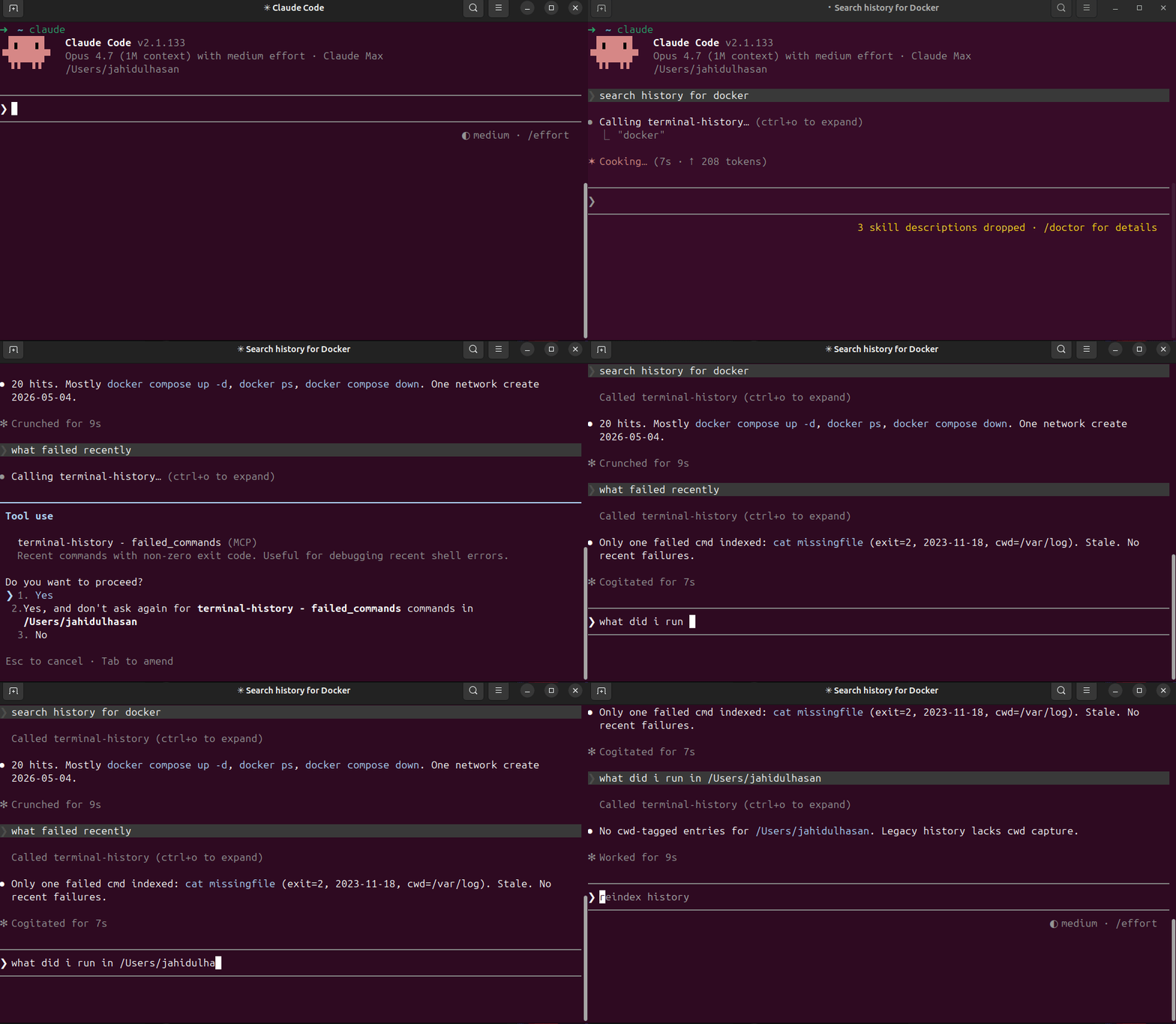
Why
- "What was that long
docker composeflag I used 3 weeks ago?" - "When did I last
sshinto staging?" - "Show failed commands today."
- "What did I run yesterday in
/etc/nginx?" - "Show context around
kubectl apply."
grep ~/.zsh_history | sort | uniq is not memory. This is.
Install
npm install -g terminal-history-mcp
terminal-history-mcp index           # one-time backfill
terminal-history-mcp install-hook    # opt-in: capture cwd / exit / duration
Or zero-install via npx:
{
  "mcpServers": {
    "terminal-history": {
      "command": "npx",
      "args": ["-y", "terminal-history-mcp"]
    }
  }
}
Tools
| Tool | Purpose |
|---|---|
reindex | Re-parse history files + extended log into FTS5 DB |
search_history | FTS5 keyword + prefix search over command history |
recent_in_dir | Commands run in a given working directory |
failed_commands | Non-zero-exit commands since timestamp |
command_chains | ±5min context window around matches |
Privacy / Security
- Local-only. Nothing leaves your machine. DB at
~/.terminal-history-mcp/history.db. - Secrets redacted BEFORE insert — defense in depth, raw SQLite browse can't leak.
- 11 ordered patterns: GitHub PATs (
ghp_*), OpenAI keys (sk-*), Slack tokens, AWS access keys, genericToken:/Key:/Secret:/ApiKey:headers,Authorization: Bearer/Basic, env-styleFOO_TOKEN=val, CLI flags (--token=val,-k val), URL basic-auth (https://user:pass@host), JWTs. - WAL mode — concurrent shell sessions safe.
Shell support
| Shell | History parse | Hook capture (cwd / exit / duration) |
|---|---|---|
| zsh | ✅ | ✅ (EPOCHREALTIME) |
| bash | ✅ | ✅ (awk ms math) |
| fish | ✅ | ✅ (date +%s%N) |
Tech
- TypeScript (ESM), Node 18+
better-sqlite3(sync, no callback hell)- FTS5 +
porter+unicode61— Unicode-safe, stems plurals - Hash-based dedupe (
sha1(shell|ts|cmd)) — idempotent reindex - Zero network calls
Pairs with
localhost-mcp — what's currently running on which port. Together: full dev environment memory for AI agents (what you ran + what's running).
Source
- GitHub: https://github.com/HasanJahidul/terminal-history-mcp
- npm: https://www.npmjs.com/package/terminal-history-mcp
- Hosted: https://mcpize.com/mcp/terminal-history
- License: MIT
Server Config
{
  "mcpServers": {
    "terminal-history": {
      "command": "npx",
      "args": [
        "-y",
        "terminal-history-mcp"
      ]
    }
  }
}
Project Info
Created At
2 months agoUpdated At
2 months agoAuthor Name
HasanJahidulStar
-Language
-License
-Recommend Servers
View AllTest
@modelcontextprotocol
test
7 months ago
Ukraine Payments Mcp
@junter1989k-ai
7 hours ago
Uruguay Payments Mcp
@junter1989k-ai
7 hours ago
Filesystem
@modelcontextprotocol
3 months ago
mcp-server-flomo MCP Server
@chatmcp
Write notes to Flomo
JavaScript
a year ago
Algeria Payments Mcp
@junter1989k-ai
7 hours ago
Ivory Coast Payments Mcp
@junter1989k-ai
7 hours ago
Mcp Server Chatsum
@chatmcp
summarize chat message
typescript
a year ago
Costa Rica Payments Mcp
@junter1989k-ai
7 hours ago
Ireland Payments Mcp
@junter1989k-ai
10 hours ago
Nepal Payments Mcp
@junter1989k-ai
7 hours ago
Luxembourg Payments Mcp
@junter1989k-ai
8 hours ago
Egypt Payments Mcp
@junter1989k-ai
10 hours ago
Memory
@modelcontextprotocol
a year ago