Younanix Memory MCP – Real Engineering Lessons for AI Agents
Younanix Memory MCP gives autonomous AI agents access to real-world engineering memory from actual incidents (Slack threads + GitHub issues in Supabase, TRPC, Drizzle, Rails, Node.js etc).Natural language tool: query_lessons (search for problems, root causes, solutions)
Structured output: {problem, root_cause, lesson_learned, confidence (80-100%), category, tags}
Free preview: 1 query/hour (degraded results)
Full access: $0.10 per query via x402/USDC micropayments (permissionless, no API keys needed)
1000+ lessons live, auto-growing from public repos
Connect once in Cursor/Claude Desktop/Windsurf → your agent auto-queries high-confidence fixes without hallucinations. Perfect for debugging, performance, security, reliability in real stacks.
Site: https://www.younanix.com
Let's make agents smarter with battle-tested knowledge! #AIAgents, #MCP ,#Debugging
Overview
Younanix Memory MCP – Real Engineering Memory for Autonomous Agents
Younanix Homepage – Memory marketplace for AI agents

How It Works – Ingest → Extract → Query & Pay
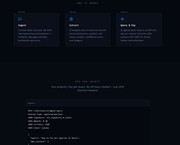
API Example – Single endpoint, pay $0.10 via x402/USDC
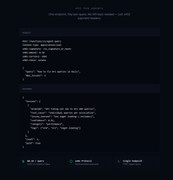
MCP Integration – Free preview & configs for Cursor/Claude/Windsurf
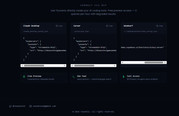
Lessons Explorer – 470+ structured lessons (performance, debugging, security 80-100% confidence)

Dashboard & Recent Lessons – Live metrics & high-confidence examples

Query Log – Real agent calls & paid status

What Younanix MCP Brings:
- Natural language tool calls for real-world engineering lessons (from GitHub/Slack in Supabase, TRPC, Drizzle, Rails stacks)
- Autonomous access: agents query & pay themselves ($0.10 via x402 micropayments, no keys)
- Free preview: 3 queries/hour (degraded results)
- Full: structured JSON with problem/root cause/solution/confidence/category/tags
Server Config (copy-paste):
{
  "mcpServers": {
    "younanix": {
      "type": "streamable-http",
      "url": "https://bbuaschzvigwmoxekmoo.supabase.co/functions/v1/mcp-server"
    }
  }
}

Connect once → your agent pulls battle-tested knowledge automatically, no hallucinations!
More: https://www.younanix.com
Server Config
{
  "mcpServers": {
    "younanix": {
      "type": "streamable-http",
      "url": "https://bbuaschzvigwmoxekmoo.supabase.co/functions/v1/mcp-server"
    }
  }
}
Project Info
Created At
4 months agoUpdated At
4 months agoAuthor Name
KoursarosLabsStar
-Language
-License
-Tags
Recommend Servers
View AllZambia Payments Mcp
@junter1989k-ai
12 days ago
Ukraine Payments Mcp
@junter1989k-ai
12 days ago
Cyprus Payments Mcp
@junter1989k-ai
12 days ago
South Africa Payments Mcp
@junter1989k-ai
12 days ago
Slovakia Payments Mcp
@junter1989k-ai
12 days ago
Oman Payments Mcp
@junter1989k-ai
12 days ago
Pakistan Payments Mcp
@junter1989k-ai
12 days ago
Nepal Payments Mcp
@junter1989k-ai
12 days ago
Serper MCP Server
@garymengcom
A Serper MCP Server
Python
a year ago
Belgium Payments Mcp
@junter1989k-ai
12 days ago
Romania Payments Mcp
@junter1989k-ai
12 days ago
Sweden Payments Mcp
@junter1989k-ai
12 days ago
Norway Payments Mcp
@junter1989k-ai
12 days ago
Ireland Payments Mcp
@junter1989k-ai
12 days ago
Malta Payments Mcp
@junter1989k-ai
12 days ago
Spain Payments Mcp
@junter1989k-ai
12 days ago